Buying Guides
What Is the Meaning of a Dedicated Graphics Card?

By Joo, 6 years advising buyers at Joo Computers Ltd
Published 7 October 2026 · Updated 7 October 2026 · 7 min read
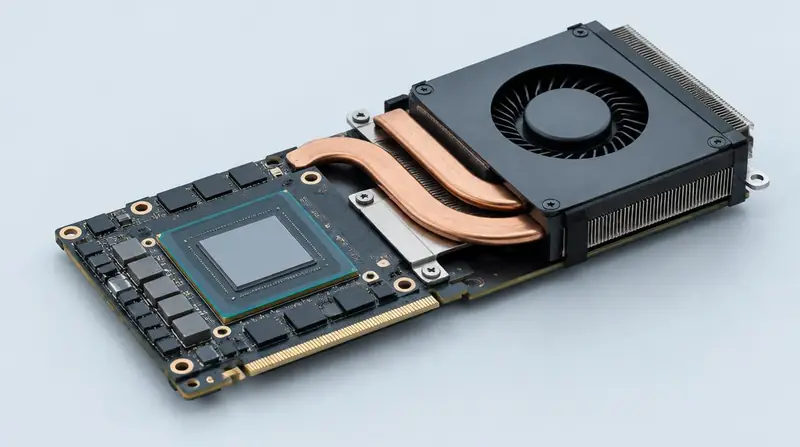
When comparing computers, you may see descriptions such as “dedicated graphics,” “2GB graphics,” or “NVIDIA graphics.” These terms describe part of the computer that handles visual work, but they do not tell you everything about its performance. For a buyer in Kenya, understanding the difference can help avoid paying for a feature you will not use—or choosing a cheaper computer that cannot handle your software. This matters when buying both new and ex-UK or refurbished machines.
What does a dedicated graphics card actually do?
A graphics processing unit, or GPU, is a processor designed to carry out many calculations at once. It creates the images you see on a screen and can speed up supported tasks such as video effects, 3D modelling, and some engineering calculations.
A dedicated GPU, also called discrete graphics, is separate from the computer’s main processor. It usually has its own video memory, called VRAM, for holding visual information such as textures and image data.
In a desktop, it is commonly a physical card plugged into the motherboard, the computer’s main circuit board. In a laptop, it is usually a chip attached to that board. Despite the word “dedicated,” a laptop GPU is generally not removable or upgradeable.
Dedicated versus integrated graphics
Integrated graphics are built into the main processor or its chip package and use part of the computer’s main memory, known as RAM. They are usually sufficient for browsing, documents, online classes, video calls, and streaming.
Dedicated graphics have their own processing hardware and video memory. They can deliver substantially better performance for demanding visual work, but generally add cost, heat, and electricity use.
Dedicated does not automatically mean faster in every comparison. A recent integrated GPU can outperform an old entry-level dedicated GPU, so the exact model and age matter.
Who needs a dedicated graphics card?
Choose graphics based on what you actually do, rather than whether a listing simply says “dedicated.” For everyday use, a responsive computer with enough RAM and a solid-state drive, or SSD, may be more useful than one with an old graphics card.
For specialist software, check the requirements for your particular version and workload. A program may run without dedicated graphics but benefit from them when projects become larger or more complex.
- Office work and study: Integrated graphics are normally enough for Word, Excel, email, research, and video meetings.
- Gaming: Dedicated graphics often help with modern, demanding games. Lighter games may run well on recent integrated graphics.
- Video editing: Basic editing can work on integrated graphics; demanding effects and high-resolution projects may benefit from a dedicated GPU.
- Architecture and engineering: Simple 2D drawings may not need one, while complex 3D models and visualisation often do.
- Graphic design: Everyday layouts and light photo editing do not automatically require dedicated graphics.
Why “2GB graphics” or “4GB graphics” is not enough information
A label such as “4GB dedicated graphics” normally describes the amount of VRAM, not the GPU’s overall speed. An older 4GB card can be slower than a newer card with less memory.
Ask for the full GPU model, not just the NVIDIA, AMD, or Intel brand name. Performance also depends on the GPU’s generation, power limits, and cooling. Laptop and desktop GPUs with similar names can perform differently.
Be careful with “total available graphics memory.” This figure can include shared system RAM and is not the same as dedicated VRAM. More shared memory does not turn integrated graphics into a dedicated graphics card.
- What is the exact GPU model?
- How much dedicated VRAM does it have?
- Does it meet the recommended requirements for my software or games?
- Are there performance tests for this exact laptop or desktop configuration?
How to plan your budget in Kenya
If your budget is around KSh 25,000–40,000 and your main tasks are office work or study, prioritise condition, a suitable processor, an SSD, and at least 8GB of RAM rather than insisting on dedicated graphics. Treat this as a budget-planning example, not a current price quotation.
For gaming or professional visual work, compare actual GPU models before setting a final budget. A low-cost, older dedicated GPU may not provide the performance or software support you need. Include enough RAM and storage in the overall budget rather than spending everything on graphics.
A desktop can offer more upgrade flexibility if you do not need portability. However, compact office desktops may not have the space, power supply, or connections needed for a suitable graphics card. Include a monitor and any backup-power requirements when comparing total costs.
What to check on an ex-UK or refurbished computer
Ex-UK describes where a computer was previously sourced, not its condition or performance. Refurbished machines can offer useful value, but the quality of testing, repairs, cooling, and battery condition varies.
An older workstation may have dedicated professional graphics without being a good modern gaming machine. Check the exact model, software compatibility, and availability of drivers—the software that lets the operating system communicate with the GPU.
Ask to see the computer running a relevant game or graphics workload, not only sitting on the desktop. A short test cannot guarantee long-term reliability, but it can reveal obvious faults.
- Confirm the installed GPU model in Windows Task Manager or the manufacturer’s specifications for that exact configuration.
- Look for visual corruption, such as flashing blocks or unusual lines, and watch for crashes under load.
- Check for excessive heat, persistently loud fans, and blocked cooling vents.
- For laptops, confirm the charger is correctly rated and ask about battery condition.
- Get the warranty, return terms, and coverage for graphics faults in writing.
A simple rule for choosing
If you mainly browse, study, attend online meetings, and use office applications, start with integrated graphics. Spend your budget on the computer’s overall condition, memory, storage, screen, and battery.
If a particular game or work application needs stronger graphics, choose a dedicated GPU that meets its recommended requirements. Buy for the exact tasks you need to perform—not simply for the words “dedicated graphics” in an advert.
Frequently asked questions
Is dedicated graphics the same as NVIDIA?
No. NVIDIA is a manufacturer, while dedicated graphics describes a type of graphics hardware. AMD and Intel also make dedicated GPUs, and the exact model matters more than the brand alone.
Can I add a dedicated graphics card to my laptop later?
Usually not, because most laptop GPUs are attached to the motherboard. Some laptops support external graphics through specific high-speed connections, but the enclosure and GPU can be expensive. If your work requires dedicated graphics, it is normally simpler to buy a laptop with suitable graphics already installed.
Is a 2GB dedicated graphics card enough?
It depends on the GPU model and your workload. Some older or lighter games and basic graphics tasks may work adequately, but many demanding modern games and large visual projects need more capability and memory. Do not choose based on the 2GB label alone.
Will dedicated graphics make Word and browsing faster?
Usually, it will not make a noticeable difference to those tasks. Enough RAM, an SSD, and a suitable main processor are generally more important. Dedicated graphics are not a cure for a computer slowed by limited memory or ageing storage.
Does a laptop with dedicated graphics use more battery?
It generally uses more power when the dedicated GPU is active. Many laptops switch to integrated graphics for lighter tasks to conserve battery, but results vary by model and settings. On a refurbished laptop, battery wear is another important factor.
Is an ex-UK laptop with dedicated graphics a good buy?
It can be, if the exact GPU suits your tasks and the machine is in good condition. Compare its age, cooling, battery, software support, and warranty against alternatives. A newer laptop with integrated graphics may be the better choice for everyday use.
Advice for your work or course
Joo Tech Finder is an educational initiative by Joo Computers Ltd. Browse all 61 guides.