Specifications
SSD vs HDD

By Joo, 6 years advising buyers at Joo Computers Ltd
Published 16 January 2025 · Updated 22 February 2025 · 4 min read
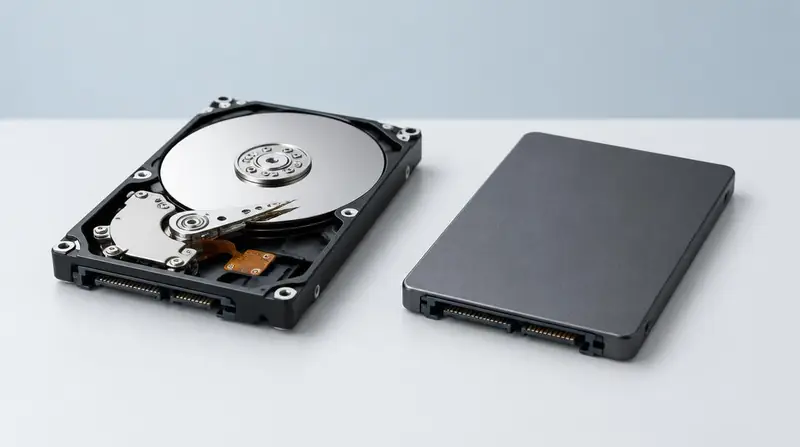
If a laptop feels slow to start, slow to open applications and slow to save files, the storage is usually responsible. This is the cheapest problem to avoid at purchase.
The practical difference
A hard drive stores data on spinning platters and reads it with a moving head. An SSD has no moving parts, so it responds almost instantly. Boot times drop from minutes to seconds and applications open without hesitation.
SSDs are also more resistant to knocks, run silently and use less power, which extends battery life.
Capacity guidance
- 256 GB: workable for documents and study if you use cloud storage.
- 512 GB: the comfortable standard for most users, including developers and designers.
- 1 TB and above: video editing, large datasets, extensive software libraries and game installations.
Hybrid setups
Some larger laptops combine a fast SSD for the operating system with a hard drive for bulk storage. This is a reasonable compromise for video or photo archives, provided the operating system lives on the SSD.
Frequently asked questions
Can an old laptop be upgraded to an SSD?
Usually yes, and it is often the single most effective upgrade available. Confirm the drive type and connector before buying parts.
Read next
Specifications
NVMe SSD Explained
Specifications
How Much RAM Do I Need?
Buying Guides
Laptop Buying Mistakes
Advice for your work or course
Joo Tech Finder is an educational initiative by Joo Computers Ltd. Browse all 61 guides.